Friday, August 1, 2014

Bootstrap Youtube Playlist Popup Player Plugin

In continuation to my previous Bootstrap YouTube Popup Player Plugin, which was only good for playing a single video, I've created another version which can work with a play-list of YouTube videos. It uses Bootstrap's Modal Popup to embed the YouTube Player and does not need any extra CSS at all.

Use the link below to view a demo or read the documentation on how to include this on your page. You can download the latest version of this plugin’s library from Github page.

Demo and Documentation: http://lab.abhinayrathore.com/bootstrap-youtube-playlist-popup/

Github: https://github.com/abhinayrathore/Bootstrap-Youtube-Playlist-Popup-Player-Plugin

Monday, March 31, 2014

Website Performance Optimization Checklist

Building high performance websites is very important because it helps in increasing the conversion rate on your website, especially eCommerce websites. There are many statistics on the web which proves that high speed websites retain more users and hence more revenue. You can checkout this nice info-graphic for a quick comparison. Even if you are not able to score a perfect 100 (not even Google.com) on the Google PageSpeed Testing Tool, at least try to stay above the 85% mark.

There is no single-bullet solution to making your site performing at top speed because every application or website is different in terms of it’s user base, data and interactivity on a multitude of devices. There are a lot of automated tools coming up like Google’s PageSpeed Module which will do most of the stuff for you or a plethora of automated build tools to perform optimizations at deploy time.

I myself was learning a lot of performance optimization techniques for my small sites but there isn’t once place where you can find links and tips to all the tools required. So, I thought of creating an exhaustive checklist of front-end performance tips and tricks. I am not a Guru in this field but this is my earnest effort to help other people like me who wants to do more fine grained optimization apart from using the automated tools.

Please visit this page and let me know if you know of any more ideas/tools/tricks which I might’ve missed:

http://lab.abhinayrathore.com/website-performance-optimization-checklist/

BTW, none of my websites will score 100% on Google PageSpeed Testing Tool because I simply don’t case that much optimization in favor of easy maintenance and ease of linking external libraries through CDN :)

Tuesday, March 11, 2014

jQuery Coding Standards and Best Practices

I’ve been using jQuery for the past couple of years and have seen a lot of bad practices and lack of standards knowledge between the developers. It’s always better to have standards defined around big teams so everyone’s on the same page. I took this effort to unify the coding standards and best practices around jQuery under one page so others can build upon it. Not all standards may apply to your application so feel free to use whatever works best for your application domain.

http://lab.abhinayrathore.com/jquery-standards/

If you find any mistakes, have any suggestions or comments, please feel free to drop a word below this post and I’ll try to address it as soon as possible.

Thursday, March 6, 2014

Bootstrap YouTube Popup Player Plugin

If you liked my previous jQuery YouTube Popup Player Plugin, I've created a Bootstrap version which is very similar in use but uses Bootstrap's Modal Popup to embed the YouTube Player. This plugin will need the complete Bootstrap library or just the Modal component to run this plugin.

Use the link below to view a demo or read the documentation on how to include this on your page. You can download the latest version of this plugin’s library from Github.

 Demo and Documentation: http://lab.abhinayrathore.com/bootstrap-youtube/

 Github: https://github.com/abhinayrathore/Bootstrap-Youtube-Popup-Player-Plugin

jQuery Cheatsheet

The last and always up-to-date version of jQuery API Cheatsheet you’ll ever need. I use web-scraping to get the latest version of jQuery and then load the API information into a nicely printable cheat-sheet.

http://lab.abhinayrathore.com/jquery-cheatsheet/

Tuesday, May 8, 2012

jQuery and jQueryUI links for Google and Microsoft CDN's

The Google Libraries API and Microsoft Ajax Content Delivery Network (CDN) hosts the popular jQuery library and enables you to easily add them to your Web applications. For example, you can start using jQuery which is hosted on this CDN simply by adding a <script> tag to your page that points to a CDN link. These CDN's are very efficient and reliable as they have more replications to reduce latency. Browsers limit the number of concurrent connections (file downloads) to a single domain so using CDN's triggers parallel downloads leading to faster page loading. Here are some reasons to USE and NOT USE the CDN networks.

The versions of jQuery keeps getting updated every now and then and it's difficult to keep track of the latest releases. For that reason I've created a page that automatically pulls in the latest versions and links for the jQuery, jQueryUI and jQueryUI Theme libraries for both Google and Microsoft CDN's. Keep it bookmarked to stay up-to-date on jQuery releases.

http://lab.abhinayrathore.com/jquery_cdn/

Sunday, February 26, 2012

Weather Geocoder with Google Maps and Google Weather API

Google Weather GeocoderI got tired of searching locations on weather reporting websites to get instant updates, so I thought of building an instant weather reporting application which would give me information for any location I click on the map. Google Maps API provides an inbuilt reverse-geocoding service which can geocode an IP Address to a place on the map. To get weather information, I’ve used the so called secret Weather API from Google which they use on the iGoogle page widget. Google has not officially published this API but we would love if they do so. The good thing about Google’s weather API is that it is easy to use and includes the weather icons, but there is no way as of now to get the data in other formats apart from XML:
http://www.google.com/ig/api?weather=Chicago.

Demo on my Labs page: http://lab.abhinayrathore.com/geocode_weather/

You can play around with the app on my labs page and view the source on the page to get the JavaScript code to build this tool on your own website. To convert the XML data from Google Weather API to JSONP, I’ve written a small PHP script you can download from the link below.

Click here to get the PHP Script for converting Google Weather API’s XML data to JSON/JSONP format.

You can style the Weather Information window according to your needs or you can use the one I’ve created: http://lab.abhinayrathore.com/geocode_weather/weather.css. You can freely modify the JavaScript code to suit your needs. If you find any bugs or see improvement opportunities, please do drop a comment below and I’ll look into it asap :)

Sunday, October 30, 2011

IMDb Search Suggestions with jQuery Autocomplete

In conjunction of my previous posts on IMDb Scraper API and jQuery Autocomplete with multiple search suggestions, on popular demand, I’ve created yet another search suggestion tool to fetch suggestions from IMDb.com. I’ve implemented a simple PHP Proxy script to get search suggestions from IMDb and format it according to jQuery Autocomplete Widget’s JSON data format.

For downloading and a guide to setup the suggestions tool on your website please visit the demo page on my labs section. You will need the suggest.php and imdbImage.php Proxy files for pulling content from IMDb.

Demo: http://lab.abhinayrathore.com/imdb_suggest/

IMDb’s suggestion API provides Title Name, Title Id, Cast, Type and Poster URL to display in the dropdown. You can customize the JavaScript code for your needs. IMDb has a leechers policy in place for media images so I’ve also included a PHP Proxy script to show IMDb Posters on search dropdown.

Saturday, October 1, 2011

jQuery Autocomplete with Multiple Search Engines

Search suggestions are one of the most important features people like to include on their sites as it minimizes the chances of typo errors and facilitate easy search my providing relevant suggestions in real time. I use a similar search suggestion tool on my personal dashboard page which works exactly like the Google suggest page. I thought of expanding it to include suggestions from multiple search engines so if I want to search some product on Amazon or some knowledge article on Wikipedia, it would get suggestions from all the engines at once. Here you can find an easy way to incorporate multiple search suggestions on your pages using jQuery and a small PHP script which combines the search suggestions.

Demo and Download: http://lab.abhinayrathore.com/autocomplete/

Search suggestion engines it can support out of the box are: Google, Bing, Yahoo, Wikipedia, Amazon and Ebay.

For adding more suggestion engines, you can read the Configuration Options section on the page above. You can download the PHP script to combine multiple search suggestions from the link above.

Tuesday, June 14, 2011

IP Address Geocoding API for Google Maps

IP Address Geocoding is getting more and more popular with people who are building their own analytics tools or want to track their users. There are a lot of free geocoding web services available which can return the geocoded data in text, XML or JSON format, the most popular ones being http://freegeoip.net, http://ipinfodb.com, http://www.hostip.info, http://www.maxmind.com and many others. Geocoded data from these website can be easily accesses by using any server side scripts, but I wanted to build a JavaScript based solution which only works using asynchronous AJAX calls. For this API I used a free web service provided by http://freegeoip.net/ which returns data in XML(http://freegeoip.net/xml/) or JSON(http://freegeoip.net/json/) format and recently added JSONP callbacks so we can implement a pure JavaScript based API.

This API uses Google Map Api to display map and geotag the IP Address. You will have to sign up for Google Map API if you haven't already done for your domain.

For demo and more information on how to use this API, please visit my lab page at:
http://lab.abhinayrathore.com/ipmapper/

Please drop a comment below if you like this API or have any modifications or improvements.

Saturday, May 7, 2011

jQuery YouTube Popup Player Plugin

As an enhancement to the YouTube Popup player tool I built almost 2 years back, I have created a jQuery plugin to display YouTube videos in a popup dialog box. This plugin embeds YouTube video using the latest iFrame code which features both Flash and HTML5 players. To display the popup dialog box I have used the jQuery UI Dialog Widget which provides a robust cross-browser dialog box with title bar and supports a movable box with modal behavior. You can even customize the jQuery UI Dialog Widget theme to suit the color and style of you website.

This is a very easy to use plugin and is flexible enough to be used on any DOM element which supports the JavaScript onclick event. You will just need to include the YouTube Video Id in any of the DOM element attributes (default: rel) and initialize it in the plugin options (if other than rel). You can even provide a Title to the popup dialog box by defining it in the element’s title attribute or plugin options.

This plugin offers many configuration options for the dialog box and YouTube video player. You can find more detailed information for configuration and setup on the demo/documentation page.

For complete demo, documentation and download visit my lab page
http://lab.abhinayrathore.com/jquery_youtube/

jQuery_YouTube_Popup_Player_Plugin_700

Please drop me a word in the comments below if you have any modification/enhancements/bug fixes or any new feature to be added to this plugin.

Changelog

UPDATE v2.3, Date: Feb 26, 2013: The biggest change in this version is that now you don't need to have the YouTube Id to embed the video links. You can now have regular YouTube URLs in the href attribute and don't need to assign the id in a separate attribute for links. If you want to use other DOM elements like images or buttons, you will still need the Id. This version is backward compatible with the old versions.
Also added a new configuration option:

  1. cssClass: (default: empty string) Attribute containing the CSS class to be assigned to the popup div.

UPDATE v2.2, Date: Aug 30, 2012: Removed some deprecated parameters from the options list

UPDATE v2.1, Date: May 23, 2012: Added 1 new configuration option:

  1. useYouTubeTitle: (default: true) Gets the video title from YouTube automatically. This option will not work if the title is overridden using the title option. If set to false, the title will fallback to the title attribute of the element.

UPDATE v2.0, Date: Oct 20, 2011: Added 3 new configuration options:

  1. hideTitleBar: (default: false) Hide the Title Bar of the Dialog Widget. (Only works with Modal option enabled.)
  2. clickOutsideClose: (default: false) Closes the Popup Dialog when clicked outside on the Modal overlay. (Only works with Modal option enabled.)
  3. overlayOpacity: (default: 0.5) Sets the opacity value (from 0 to 1) for the Dialog Widget overlay.

Saturday, February 26, 2011

jQuery Nivo Slider with CSS3 Round Corners

First things first, kudos to John O'Nolan for jQuery Nivo Slider. Great stuff! I was trying to use this slider on my website and wanted to use CSS3 round corners. Unfortunately I was not able to use round corners on the outer div because of the multiple slides overlapping over it. I tried many ways of achieving this using CSS but couldn’t find an optimal way to do it. Finally I modified the Nivo Sliders JavaScript library to include round corners without modifying the CSS file. I added a new option (borderRadius) which can be defined when the slider is initialized.

Demo on my Labs page

How to download and use this modified library:

  1. Download and configure the library as described by the original developer: http://nivo.dev7studios.com/#usage
  2. Get the new JavaScript file and use it instead of the original library file:
  3. NO changes required in the CSS file.
  4. Add new “borderRadius” option while initialization to define the border radius (default value is 10px).

Example usage:
$(window).load(function() {
    $('#slider').nivoSlider({ borderRadius: 20 });
});

Thanks once again to John for this awesome script. Keep up the good work.
Let me know if you find any bugs in the script and I’ll try to address them asap.

del.icio.us Tags:

Saturday, January 29, 2011

Free PHP Rotten Tomatoes Scraping API

In continuation to my previous posts on PHP and ASP.NET IMDb Scraping API’s, I have designed one more movie information scraping API for RottenTomatoes.com. Rotten Tomatoes is one of the most popular movie review website which provides a comprehensive movie rating system involving critics from all the popular news networks.

This API includes scraping of lot of attributes from Rotten Tomatoes along with the functionality of scraping newly released DVD list. You can extend the PHP code on your own to include more functionality or drop a comment here and I’ll try to help you as much as I can.

Here is a list of all the attributes it scraps from Rotten Tomatoes page:

  1. TITLE
  2. YEAR
  3. POSTER
  4. ALL_CRITICS_PERCENTAGE
  5. ALL_CRITICS_AVERAGE_RATING
  6. ALL_CRITICS_COUNT
  7. USER_PERCENTAGE
  8. USER_AVERAGE_RATING
  9. USER_COUNT
  10. GENRES
  11. SYNOPSIS
  12. MPAA_RATING
  13. RUNTIME
  14. RELEASE_DATE
  15. BOX_OFFICE
  16. DIRECTORS
  17. WRITERS
  18. CAST
  19. REVIEWS

How to use this API:
Include the class file on your php page
include("rottentomatoes.php");
Instantiate the class and get the results in an array:
$rottentomatoes = new RottenTomatoes();
$movieArray = $rottentomatoes->getMovieInfo("Inception");

How to get the New DVD Release list:
$rottentomatoes = new RottenTomatoes();
$dvdArray = $rottentomatoes->getNewDvdReleases();

You can try this scraper on my lab page: http://lab.abhinayrathore.com/rottentomatoes/

Download PHP Source Code: http://lab.abhinayrathore.com/rottentomatoes/rottentomatoes2.htm

Example usage: http://lab.abhinayrathore.com/rottentomatoes/usage.txt

If you need some more additions or corrections to this API, please drop a comment here and I’ll try to include it asap.

Thursday, November 25, 2010

FREE! ASP.net/C# IMDb Scraping API


In extension to my previous IMDb Scraping API in PHP, I have converted the code to ASP.net/C# based IMDb scraper. In my de facto development style, I have kept the code pretty simple and concise. For more details on the movie information it scraps, please refer to my previous post. I don’t have an IIS server running to demonstrate the code but it is functionally similar to my PHP Scraper API so you can test it on the link below. And above all... it’s FREE!!!

Test the Scraper API: http://lab.abhinayrathore.com/imdb/

Download C# Class file: http://lab.abhinayrathore.com/imdb/imdb_asp_csharp.htm
(Add this class file to your project and rename the namespace accordingly)
To convert this C# code to VB.net use this tool:
http://www.developerfusion.com/tools/convert/csharp-to-vb/

Fork it on GitHub: https://github.com/abhinayrathore/ASP.NET-IMDb-Scraper

Download DLL file: http://lab.abhinayrathore.com/imdb/IMDb.dll
(Copy this DLL file to your project folder and add it to the project references)

How to use this class:

  1. Include the class on your ASP page.
  2. Instantiate the class: IMDb imdb = new IMDb("The Godfather", true);
    (Second parameter is an optional Boolean value for scraping extra movie information.)
  3. Access the movie information using public variables: imdb.Id, imdb.Title etc.

It’s been a while since I worked on ASP.net, so if you have any improvements or suggestions, do let me know :)

Saturday, October 30, 2010

FREE! PHP IMDb Scraper/API for new IMDb Template


IMDb is undoubtedly the leading information source for media information and is the top target of web scraping for movie lovers around the world. Unfortunately IMDb does not provide an API to access its database so web scraping is the only resort for us. PHP being one of the most commonly used and powerful web development language enables easy web scraping with the power of PCRE (Perl Compatible Regular Expressions).

For my recent project on a Movie Catalog (http://movies.abhinayrathore.com), I needed a  IMDb scraper and found one built by Tyler Hall. His version was not robust enough to scrap all kind of movie pages so I extended it and made it more robust to support different type of titles, BUT recently IMDb changed its page template and most of the old scrapers stopped working including mine. So, I modified my scraper to accommodate the new template changes and considered it as my moral responsibility to contribute back to the developer community.

This new scraper is very robust and capable enough to handle a wide variety of new template modifications. Apart from the regular information it even goes deep to scan extra media images and release dates.

Click here for a Demo

Last Updated: Feb 1, 2014

Major changes in Feb 20, 2013 version:

  1. Now we use the combined information page to scrape the data. This page doesn't change quite often and we can get complete list of individual departments.
  2. Add a few more entities; producers, musicians, cinematographers, editors etc. Removed metascore information. Removed small poster url.
  3. You can now pass a second boolean parameter to the getMovieInfo() and getMovieInfoById() functions to disable the extra information. By default it is set to true and may slow down the scraping. If you don't need all the extra info like Storyline, Release Dates, Recommendations or Media Images, just pass false as second parameter to these methods. Example $movieArray = $imdb->getMovieInfo("The Godfather", false);.
  4. Information for individuals in the list of directors, cast, writers etc. is now in an associative array with key being the IMDb id of the individual.

UPDATE:
As some of you might have noticed, Google is preventing automated script access to its search result pages. I have created 2 search functions for Google and Bing so you can use whichever one works best for you. I have converted the code to use Bing as of now and will look for other alternatives if we run into some hurdles. Keep me updated if you have any better ideas :)

Here is a list of all the attributes it scraps from the IMDb page:

  1. TITLE_ID
  2. TITLE
  3. YEAR
  4. RATING
  5. GENRES
  6. STARS
  7. DIRECTORS
  8. WRITERS
  9. CAST
  10. PRODUCERS
  11. MUSICIANS
  12. CINEMATOGRAPHERS
  13. EDITORS
  14. ALSO_KNOWN_AS
  15. RELEASE_DATE
  16. RELEASE_DATES
  17. PLOT
  18. POSTER
  19. POSTER_LARGE
  20. RUNTIME
  21. TOP_250
  22. OSCARS
  23. AWARDS
  24. NOMINATIONS
  25. STORYLINE
  26. TAGLINE
  27. MEDIA_IMAGES
  28. MPAA_RATING
  29. VOTES
  30. RECOMMENDED_TITLES
  31. VIDEOS

How to use this PHP Scraper?
Include the class file on your php page
include("imdb.php");
Instantiate the class and get the results in an array:
$imdb = new Imdb();
$movieArray = $imdb->getMovieInfo("The Godfather");

You can try this scraper on my lab page: http://lab.abhinayrathore.com/imdb/

To download the PHP Source Code directly use this link: http://lab.abhinayrathore.com/imdb/imdb_php.htm

Fork it on GitHub: https://github.com/abhinayrathore/PHP-IMDb-Scraper

Example usage: http://lab.abhinayrathore.com/imdb/usage.htm

Proxy script for downloading or displaying Media images on your website: http://lab.abhinayrathore.com/imdb/imdbImage.txt

To implement you own IMDb Web Service API to return data in XML, JSON or JSONP format, use this script along with the API: http://lab.abhinayrathore.com/imdb/imdbWebService.htm

To implement IMDb.com's search suggestions on your website, please follow this post: http://web3o.blogspot.com/2011/10/imdb-search-suggestions-with-jquery.html

If you find any part of this scraper broken or incorrect, please drop a comment here and I’ll try to fix it as soon as possible.

IMDb has a leechers policy in place for media images. You may not be able to use the URL for some of the images to display on your website. As a workaround you can use a PHP Proxy to display or download those images. I’ve written a small proxy script to grab the images: http://lab.abhinayrathore.com/imdb/imdbImage.txt. To use this script you just need to pass the image URL as a request parameter:
<img src="imdbImage.php?url=<?=$url?>" />

NOTE: For users outside of USA
IMDb will automatically redirect you to titles listed in the language used for release in your country (Read more).
To see films listed under their original titles regardless of your country region you will have to modify this script to scrap the titles from http://akas.imdb.com because http://www.imdb.com will automatically redirect you to your country specific title page.

Happy Scraping :)

Friday, May 28, 2010

Google Maps: Dynamically Drawn and Resizable Polygon Overlay

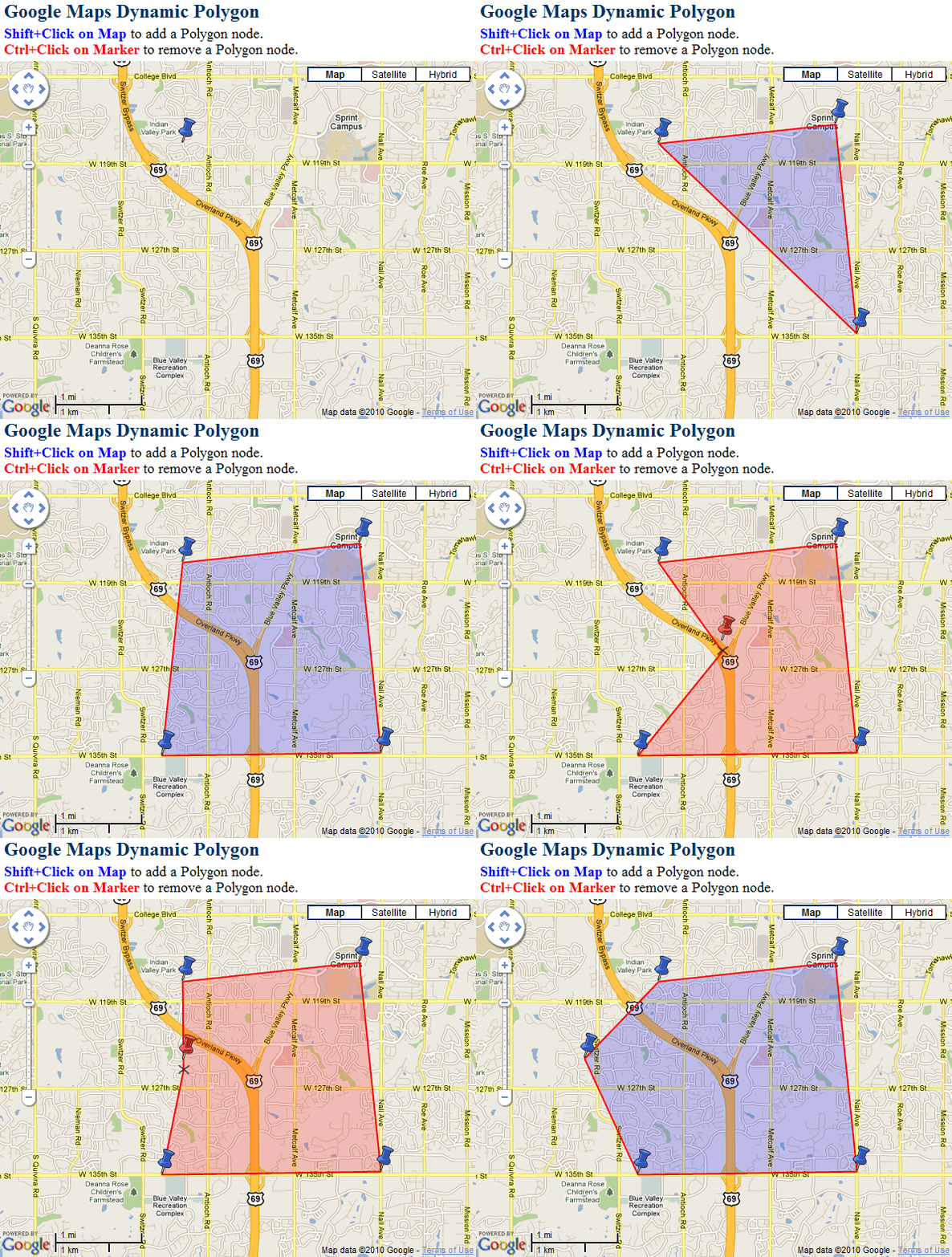
In extension to my previous post on Dynamically Movable and Resizable Circle Overlay, I created yet another nifty tool to dynamically draw a polygon overlay on Google Maps. You won’t find another robust tool like this for Polygon drawing on the internet. Users can draw polygon dynamically by adding, deleting and moving the polygon boundary nodes. User can press shift+click on the map to add a new node to polygon boundary or they can press ctrl+click on any node marker to remove it. The node markers can be dragged around to resize the polygon.

This is how it looks like in action:
Google Maps Dynamic Polygon

The JavaScript code is pretty easy to modify for your custom needs. The initialize() function is used to initialize the Google Map object when the page loads. A click event is also added to the map for adding node markers on the map. The click event takes care of the case when the user click on the previous markers while holding the shift key. When the user clicks on the map, addMarker() function is called to add another boundary node to the polygon. For every newly added marker, drag events are assigned for resizing the polygon and a click event is assigned to delete the node when ctrl key is pressed while clicking the marker pin. The fitPolygon() function is used to set map bounds and center to adjust the polygon inside it.

Put the following JavaScript code in the head section of your page:

<script src="http://maps.google.com/maps?file=api&amp;v=2&amp;key=YOUR_API_KEY&sensor=true" type="text/javascript"></script>
<script type="text/javascript">
/* Developed by: Abhinay Rathore [web3o.blogspot.com] */ 
//Global variables
var global = this;
var map;

var PolygonMarkers = []; //Array for Map Markers
var PolygonPoints = []; //Array for Polygon Node Markers
var bounds = new GLatLngBounds; //Polygon Bounds
var Polygon; //Polygon overlay object
var polygon_resizing = false; //To track Polygon Resizing

//Polygon Marker/Node icons
var redpin = new GIcon(); //Red Pushpin Icon
redpin.image = "http://maps.google.com/mapfiles/ms/icons/red-pushpin.png";
redpin.iconSize = new GSize(32, 32);
redpin.iconAnchor = new GPoint(10, 32);
var bluepin = new GIcon(); //Blue Pushpin Icon
bluepin.image = "http://maps.google.com/mapfiles/ms/icons/blue-pushpin.png";
bluepin.iconSize = new GSize(32, 32);
bluepin.iconAnchor = new GPoint(10, 32);

function initialize() { //Initialize Google Map
    if (GBrowserIsCompatible()) {
        map = new GMap2(document.getElementById("map_canvas")); //New GMap object
        map.setCenter(new GLatLng(38.90, -94.68007), 13);

        var ui = new GMapUIOptions(); //Map UI options
        ui.maptypes = { normal:true, satellite:true, hybrid:true, physical:false }
        ui.zoom = {scrollwheel:true, doubleclick:true};
        ui.controls = { largemapcontrol3d:true, maptypecontrol:true, scalecontrol:true };
        map.setUI(ui); //Set Map UI options

        //Add Shift+Click event to add Polygon markers
        GEvent.addListener(map, "click", function(overlay, point, overlaypoint) {
            var p = (overlaypoint) ? overlaypoint : point;
            //Add polygon marker if overlay is not an existing marker and shift key is pressed
            if (global.shiftKey && !checkPolygonMarkers(overlay)) { addMarker(p); }
        });
    }
}

// Adds a new Polygon boundary marker
function addMarker(point) {
    var markerOptions = { icon: bluepin, draggable: true };
    var marker = new GMarker(point, markerOptions);
    PolygonMarkers.push(marker); //Add marker to PolygonMarkers array
    map.addOverlay(marker); //Add marker on the map
    GEvent.addListener(marker,'dragstart',function(){ //Add drag start event
        marker.setImage(redpin.image);
        polygon_resizing = true;
    });
    GEvent.addListener(marker,'drag',function(){ drawPolygon(); }); //Add drag event
    GEvent.addListener(marker,'dragend',function(){   //Add drag end event
        marker.setImage(bluepin.image);
        polygon_resizing = false;
        drawPolygon();
        fitPolygon();
    });
    GEvent.addListener(marker,'click',function(point) { //Add Ctrl+Click event to remove marker
        if (global.ctrlKey) { removeMarker(point); }
    });
    drawPolygon();

    //If more then 2 nodes then automatically fit the polygon
    if(PolygonMarkers.length > 2) fitPolygon();
}

// Removes a Polygon boundary marker
function removeMarker(point) {
    if(PolygonMarkers.length == 1){ //Only one marker in the array
        map.removeOverlay(PolygonMarkers[0]);
        map.removeOverlay(PolygonMarkers[0]);
        PolygonMarkers = [];
        if(Polygon){map.removeOverlay(Polygon)};
    }
      else //More then one marker
      {
        var RemoveIndex = -1;
        var Remove;
        //Search for clicked Marker in PolygonMarkers Array
        for(var m=0; m<PolygonMarkers.length; m++)
        {
            if(PolygonMarkers[m].getPoint().equals(point))
            {
                RemoveIndex = m; Remove = PolygonMarkers[m]
                break;
            }
        }
        //Shift Array elemeents to left
        for(var n=RemoveIndex; n<PolygonMarkers.length-1; n++)
        {
            PolygonMarkers[n] = PolygonMarkers[n+1];
        }
        PolygonMarkers.length = PolygonMarkers.length-1 //Decrease Array length by 1
        map.removeOverlay(Remove); //Remove Marker
        drawPolygon(); //Redraw Polygon
      }
}

//Draw Polygon from the PolygonMarkers Array
function drawPolygon()
{
    PolygonPoints.length=0;
    for(var m=0; m<PolygonMarkers.length; m++)
    {
        PolygonPoints.push(PolygonMarkers[m].getPoint()); //Add Markers to PolygonPoints node array
    }
    //Add first marker in the end to close the Polygon
    PolygonPoints.push(PolygonMarkers[0].getPoint());
    if(Polygon){ map.removeOverlay(Polygon); } //Remove existing Polygon from Map
    var fillColor = (polygon_resizing) ? 'red' : 'blue'; //Set Polygon Fill Color
    Polygon = new GPolygon(PolygonPoints, '#FF0000', 2, 1, fillColor, 0.2); //New GPolygon object
    map.addOverlay(Polygon); //Add Polygon to the Map

    //TO DO: Function Call triggered after Polygon is drawn
}

//Fits the Map to Polygon bounds
function fitPolygon(){
    bounds = Polygon.getBounds();
    map.setCenter(bounds.getCenter(), map.getBoundsZoomLevel(bounds));
}
//check is the marker is a polygon boundary marker
function checkPolygonMarkers(marker) {
    var flag = false;
    for (var m = 0; m < PolygonMarkers.length; m++) {
        if (marker == PolygonMarkers[m])
        { flag = true; break; }
    }
    return flag;
}

//////////////////[ Key down event handler ]/////////////////////
//Event handler class to attach events
var EventUtil = {
      addHandler: function(element, type, handler){
            if (element.addEventListener){
                    element.addEventListener(type, handler, false);
            } else if (element.attachEvent){
                    element.attachEvent("on" + type, handler);
            } else {
                    element["on" + type] = handler;
            }
      }
};

// Attach Key down/up events to document
EventUtil.addHandler(document, "keydown", function(event){keyDownHandler(event)});
EventUtil.addHandler(document, "keyup", function(event){keyUpHandler(event)});

//Checks for shift and Ctrl key press
function keyDownHandler(e)
{
      if (!e) var e = window.event;
      var target = (!e.target) ? e.srcElement : e.target;
      if (e.keyCode == 16 && !global.shiftKey) { //Shift Key
            global.shiftKey = true;
      }
      if (e.keyCode == 17 && !global.ctrlKey) { //Ctrl Key
            global.ctrlKey = true;
      }
}
//Checks for shift and Ctrl key release
function keyUpHandler(e){
      if (!e) var e = window.event;
      if (e.keyCode == 16 && global.shiftKey) { //Shift Key
            global.shiftKey = false;
      }
      if (e.keyCode == 17 && global.ctrlKey) { //Ctrl Key
            global.ctrlKey = false;
      }
}
</script>

To initialize the map you can call the functions on page load event and include a div tag inside your body to hold the Map.

<body onload="initialize()" onunload="GUnload()">
<div id="map_canvas" style="width:100%; height:450px"></div>
</body>

Feel free to modify and use this code on your website. I have used API v2 for my code but you can easily modify this code for API v3. Happy Mapping!

Thursday, May 27, 2010

Google Maps: Dynamically Movable and Resizable Circle Overlay

Google provides a pretty wholesome Map API for creating customized maps with enhanced features. In a recent project of mine I had to use dynamically drawn map overlays for searching house properties within them. To implement that I looked for some algorithms to draw circles on Google Map Overlays and found a good one at http://koti.mbnet.fi/ojalesa/googlepages/circle.htm, but this program was built to change the radius using html form field. To take it a few steps further, I planned to make this circle movable and resizable by directly dragging map icons.

      This is one of the best dynamic circle overlay drawing tool you can find on internet. There are two pin markers to alter the circle, the Blue pin is used to drag the circle around on the map and the Red one can be dragged to resize the circle. You can even set minimum and maximum radius for the circle in the JavaScript code. The resize marker pin always stays at the 0 degree edge of the circle. The Circle fill color changes to red if the circle is moved or resized.

This is how it looks like in action: 

Google Map Dynamic Circle

JavaScript code: The logistic code is pretty easy to modify for your custom needs. The initialize() function is used to initialize the Google Map object when the page loads. Circle Center and Resize markers are then added at the default center location. Marker drag events are assigned to Center and Resize markers for dragging and resizing the circle. The drawCircle() function implements the algorithm for drawing the circle and finally the fitCircle() function is used to set the Map bounds to include the full circle inside it. If you want to trigger any other function after the circle is drawn, you can call your function after the fitCircle() function call at the end of drawCircle() function. Google Map uses Metric Units for distance by default, you will have to use conversion factor (1km = 0.621371192mi) to convert radius value into miles if you wish to.

Place the following JavaScript code in the head section of your page:
<script src="http://maps.google.com/maps?file=api&amp;v=2&amp;key=YOUR_API_KEY&sensor=true" type="text/javascript"></script>
<script type="text/javascript">
/* Developed by: Abhinay Rathore [web3o.blogspot.com] */
//Global variables
var map;
var bounds = new GLatLngBounds; //Circle Bounds
var map_center = new GLatLng(38.903843, -94.680096);

var Circle; //Circle object
var CirclePoints = []; //Circle drawing points
var CircleCenterMarker, CircleResizeMarker;
var circle_moving = false; //To track Circle moving
var circle_resizing = false; //To track Circle resizing
var radius = 1; //1 km
var min_radius = 0.5; //0.5km
var max_radius = 5; //5km

//Circle Marker/Node icons
var redpin = new GIcon(); //Red Pushpin Icon
redpin.image = "http://maps.google.com/mapfiles/ms/icons/red-pushpin.png";
redpin.iconSize = new GSize(32, 32);
redpin.iconAnchor = new GPoint(10, 32);
var bluepin = new GIcon(); //Blue Pushpin Icon
bluepin.image = "http://maps.google.com/mapfiles/ms/icons/blue-pushpin.png";
bluepin.iconSize = new GSize(32, 32);
bluepin.iconAnchor = new GPoint(10, 32);

function initialize() { //Initialize Google Map
    if (GBrowserIsCompatible()) {
        map = new GMap2(document.getElementById("map_canvas")); //New GMap object
        map.setCenter(map_center);

        var ui = new GMapUIOptions(); //Map UI options
        ui.maptypes = { normal:true, satellite:true, hybrid:true, physical:false }
        ui.zoom = {scrollwheel:true, doubleclick:true};
        ui.controls = { largemapcontrol3d:true, maptypecontrol:true, scalecontrol:true };
        map.setUI(ui); //Set Map UI options

        addCircleCenterMarker(map_center);
        addCircleResizeMarker(map_center);
        drawCircle(map_center, radius);
    }
}

// Adds Circle Center marker
function addCircleCenterMarker(point) {
    var markerOptions = { icon: bluepin, draggable: true };
    CircleCenterMarker = new GMarker(point, markerOptions);
    map.addOverlay(CircleCenterMarker); //Add marker on the map
    GEvent.addListener(CircleCenterMarker, 'dragstart', function() { //Add drag start event
        circle_moving = true;
    });
    GEvent.addListener(CircleCenterMarker, 'drag', function(point) { //Add drag event
        drawCircle(point, radius);
    });
    GEvent.addListener(CircleCenterMarker, 'dragend', function(point) { //Add drag end event
        circle_moving = false;
        drawCircle(point, radius);
    });
}

// Adds Circle Resize marker
function addCircleResizeMarker(point) {
    var resize_icon = new GIcon(redpin);
    resize_icon.maxHeight = 0;
    var markerOptions = { icon: resize_icon, draggable: true };
    CircleResizeMarker = new GMarker(point, markerOptions);
    map.addOverlay(CircleResizeMarker); //Add marker on the map
    GEvent.addListener(CircleResizeMarker, 'dragstart', function() { //Add drag start event
        circle_resizing = true;
    });
    GEvent.addListener(CircleResizeMarker, 'drag', function(point) { //Add drag event
        var new_point = new GLatLng(map_center.lat(), point.lng()); //to keep resize marker on horizontal line
        var new_radius = new_point.distanceFrom(map_center) / 1000; //calculate new radius
        if (new_radius < min_radius) new_radius = min_radius;
        if (new_radius > max_radius) new_radius = max_radius;
        drawCircle(map_center, new_radius);
    });
    GEvent.addListener(CircleResizeMarker, 'dragend', function(point) { //Add drag end event
        circle_resizing = false;
        var new_point = new GLatLng(map_center.lat(), point.lng()); //to keep resize marker on horizontal line
        var new_radius = new_point.distanceFrom(map_center) / 1000; //calculate new radius
        if (new_radius < min_radius) new_radius = min_radius;
        if (new_radius > max_radius) new_radius = max_radius;
        drawCircle(map_center, new_radius);
    });
}

//Draw Circle with given radius and center
function drawCircle(center, new_radius) {
    //Circle Drawing Algorithm from: http://koti.mbnet.fi/ojalesa/googlepages/circle.htm

    //Number of nodes to form the circle
    var nodes = new_radius * 40;
    if(new_radius < 1) nodes = 40;

    //calculating km/degree
    var latConv = center.distanceFrom(new GLatLng(center.lat() + 0.1, center.lng())) / 100;
    var lngConv = center.distanceFrom(new GLatLng(center.lat(), center.lng() + 0.1)) / 100;

    CirclePoints = [];
    var step = parseInt(360 / nodes) || 10;
    var counter = 0;
    for (var i = 0; i <= 360; i += step) {
        var cLat = center.lat() + (new_radius / latConv * Math.cos(i * Math.PI / 180));
        var cLng = center.lng() + (new_radius / lngConv * Math.sin(i * Math.PI / 180));
        var point = new GLatLng(cLat, cLng);
        CirclePoints.push(point);
        counter++;
    }
    CircleResizeMarker.setLatLng(CirclePoints[Math.floor(counter / 4)]); //place circle resize marker
    CirclePoints.push(CirclePoints[0]); //close the circle polygon
    if (Circle) { map.removeOverlay(Circle); } //Remove existing Circle from Map
    var fillColor = (circle_resizing || circle_moving) ? 'red' : 'blue'; //Set Circle Fill Color
    Circle = new GPolygon(CirclePoints, '#FF0000', 2, 1, fillColor, 0.2); //New GPolygon object for Circle
    map.addOverlay(Circle); //Add Circle Overlay on the Map
    radius = new_radius; //Set global radius
    map_center = center; //Set global map_center
    if (!circle_resizing && !circle_moving) { //Fit the circle if it is nor moving or resizing
        fitCircle();
        //Circle drawing complete trigger function goes here

    }
}

//Fits the Map to Circle bounds
function fitCircle() {
    bounds = Circle.getBounds();
    map.setCenter(bounds.getCenter(), map.getBoundsZoomLevel(bounds));
}
</script>

To initialize the map you can call the functions on page load event and include a div tag inside your body to hold the Map.

<body onload="initialize()" onunload="GUnload()">
<div id="map_canvas" style="width:100%; height:450px"></div>
</body>

Feel free to modify and use this code on your website. I have used API v2 for my code but you can easily modify this code for API v3. Happy Mapping!