Friday, May 29, 2009

Round Cornered Div tags without using images

Yes you read it right! without using images. Round cornered boxes give a very elegant look to web pages, and so you’ll find a plethora of articles on internet for making round corners using images. While looking for some efficient way to do this I stumbled upon an article by Joshua Sowin where he used a nice trick of using HTML bullet character to make round corners. Inspired from his trick I designed my own div tags using the same technique while providing more flexibility with the content and corners with transparent background.

The Trick: its pretty simple, instead of using round images to make the corners round, we have used HTML bullet character (•) with increased font size to make the corners look round. The HTML Code for the bullet is “•” or “•”. The difficult part of this technique was to align the bullet character in the corners by hit and try. I have included CSS code for different padding sizes of 20, 15 and 10 pixels. Here is how the 20px padding div tag looks like (with a background):
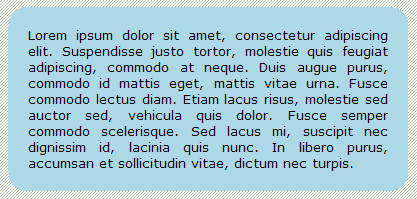
Round Cornered Div tag with 20px padding

Why should you use this technique:

  1. Speed: Your page will load faster if there are no extra images to download. Bullet is a standard HTML entity and is supported by all the browsers.
  2. Ease of use: To create round corners using images you need to create images of different colors and sizes. Here you can just adjust the CSS colors, reduce/increase the font size and align the bullets accordingly inside the corners.
  3. Scalability: Corner bullets can be resized and aligned in CSS on the fly and the div tag can scale to any size.

You can change the div tag width as instructed in the CSS code and the height will adjust automatically based upon the content size. There are three places in the code where you need to change the color value to change the fill color for the div tag. The remaining part of the corners will have transparent background because no background color is used.

CSS Code for 20px padding:
<style type="text/css">
/* Developed by: Abhinay Rathore [web3o.blogspot.com] */
/* Round Cornered Div Tag without images with 20px padding */
<!--
div.round_container {
      width: 400px; /* Change Div Tag width here */
      position: relative;
}
div.top_left,div.top_right,div.bottom_left,div.bottom_right {
      height: 20px;
      width: 20px;
      float: left;
      position: relative;
      overflow: hidden;
}
div.top_left_inside,div.top_right_inside,div.bottom_left_inside,div.bottom_right_inside {
      height: 20px;
      width: 20px;
      font-family: Arial, Helvetica, sans-serif;
      font-size: 150px;
      color: LIGHTBLUE; /* Change Div Tag color here */
      position: relative;
      line-height: 40px;
}
div.top_left_inside { left: -8px; }
div.top_right_inside { left: -25px; }
div.bottom_left_inside { left:-8px; top:-17px; }
div.bottom_right_inside { left:-25px; top:-17px; }
div.top_center,div.bottom_center {
      height: 20px;
      /* Change width according to div tag width and corner size */
      /* Center width = div tag width - 2 x corner width */
      width: 360px;
      float: left;
      background-color: LIGHTBLUE; /* Change Div Tag color here */
}
div.center {
      clear: both;
      background-color: LIGHTBLUE; /* Change Div Tag color here */
      padding-right: 20px;
      padding-left: 20px;
      text-align: justify;
      font-family: Verdana, Geneva, sans-serif;
      font-size: small;
}
-->
</style>

HTML Code:
<div class="round_container">
<div class="top_left"><div class="top_left_inside">&#8226;</div></div>
<div class="top_center"></div>
<div class="top_right"><div class="top_right_inside">&#8226;</div></div>
<div class="center">Your content goes here!</div>
<div class="bottom_left"><div class="bottom_left_inside">&#8226;</div></div>
<div class="bottom_center"></div>
<div class="bottom_right"><div class="bottom_right_inside">&#8226;</div></div>
</div>

I have also included CSS code for 15px and 10px padding div tags below. You can use the same HTML code from above for all the different padding styles. If you wish to create your own padding size, then you can play around with the same CSS by changing the font size, corner size, colors, padding and bullet alignment in the inside boxes.

Div Tag with 15px padding:

Round Cornered Div tag with 15px padding

CSS Code for 15px padding:
<style type="text/css">
<!--
div.round_container { width: 400px; position: relative; }
div.top_left,div.top_right,div.bottom_left,div.bottom_right {
      height: 15px; width: 15px; float: left;
      position: relative; overflow: hidden;
}
div.top_left_inside,div.top_right_inside,div.bottom_left_inside,div.bottom_right_inside {
      height: 15px; width: 15px;
      font-family: Arial, Helvetica, sans-serif;
      font-size: 112px; color: LIGHTBLUE;
      position: relative;     line-height: 32px;
}
div.top_left_inside { left: -6px; }
div.top_right_inside { left: -19px; }
div.bottom_left_inside { left:-6px; top:-14px; }
div.bottom_right_inside { left:-19px; top:-14px; }
div.top_center,div.bottom_center {
      height: 15px; width: 370px;
      float: left; background-color: LIGHTBLUE;
}
div.center {
      clear: both; background-color: LIGHTBLUE;
      padding-right: 15px; padding-left: 15px;
      text-align: justify; font-size: small;
      font-family: Verdana, Geneva, sans-serif;
}
-->
</style>

Div Tag with 10px padding:
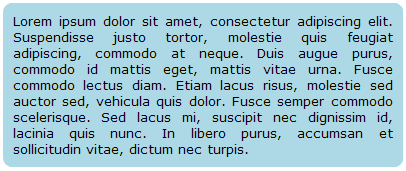
Round Cornered Div tag with 10px padding

CSS Code for 10px padding:
<style type="text/css">
<!--
div.round_container { width: 400px; position: relative; }
div.top_left,div.top_right,div.bottom_left,div.bottom_right {
      height: 10px; width: 10px; float: left;
      position: relative; overflow: hidden;
}
div.top_left_inside,div.top_right_inside,div.bottom_left_inside,div.bottom_right_inside {
      height: 10px; width: 10px;
      font-family: Arial, Helvetica, sans-serif;
      font-size: 75px; color: LIGHTBLUE;
      position: relative;     line-height: 22px;
}
div.top_left_inside { left: -4px; }
div.top_right_inside { left: -13px; }
div.bottom_left_inside { left:-4px; top:-10px; }
div.bottom_right_inside { left:-13px; top:-10px; }
div.top_center,div.bottom_center {
      height: 10px; width: 380px;
      float: left; background-color: LIGHTBLUE;
}
div.center {
      clear: both; background-color: LIGHTBLUE;
      padding-right: 10px; padding-left: 10px;
      text-align: justify; font-size: small;
      font-family: Verdana, Geneva, sans-serif;
}
-->
</style>

NOTE: I have only tested this technique on IE-7, IE-8, Firefox 3.0.10 and Opera 9.64. It might not work with some old browsers. You may have to modify the CSS to make it compatible with old browsers.

Technorati Tags: ,

Tuesday, May 26, 2009

Search multiple search engines from a single search field like Katapulco.com on your website using JavaScript and DHTML

Here is an easy to use JavaScript function to embed a Katapulco.com like search engine on your website. Katapulco does a nice job at integrating almost all the popular search engines using a single search field. I have used a similar approach and designed this JavaScript function which you can place on your websites and get similar search functionalities.

To search on a specific website the user needs to append the appropriate search prefix before the search string. For example if you are looking for JavaScript eBooks on Google Books, you need to search for “gb javascript”, where gb is the search prefix for Google Books and following string is the search string. Here is a screenshot of the search page with the list of search prefixes implemented:

image

I have tried to include a lot of popular websites to search from, to add your own search prefix to the list follow the instructions given after the code. Here is the complete HTML file code:

<!DOCTYPE html PUBLIC "-//W3C//DTD XHTML 1.0 Transitional//EN" "http://www.w3.org/TR/xhtml1/DTD/xhtml1-transitional.dtd">
<html xmlns="http://www.w3.org/1999/xhtml">
<head>
<meta http-equiv="Content-Type" content="text/html; charset=utf-8" />
<title>My Search Engine</title>

<script type="text/javascript">
// Developed by: Abhinay Rathore [http://web3o.blogspot.com/]
function mysearch() {
var search_string = document.getElementById("s").value.toLowerCase();
//Default Google Search string
var url = "http://www.google.com/search?q=" + search_string;
//Page redirect URL based upon the search prefix
if (search_string.indexOf("g ") == 0) //Google Web search
{ url = "http://www.google.com/search?q=" + search_string.substring(2); }
if (search_string.indexOf("gi ") == 0) //Google Image search
{ url = "http://images.google.com/images?q=" + search_string.substring(3); }
if (search_string.indexOf("gv ") == 0) //Google Video search
{ url = "http://video.google.com/videosearch?q=" + search_string.substring(3); }
if (search_string.indexOf("gm ") == 0) //Google Maps search
{ url = "http://maps.google.com/?q=" + search_string.substring(3); }
if (search_string.indexOf("gn ") == 0) //Google News search
{ url = "http://news.google.com/news?q=" + search_string.substring(3); }
if (search_string.indexOf("gp ") == 0) //Google Product search
{ url = "http://www.google.com/products?q=" + search_string.substring(3); }
if (search_string.indexOf("gb ") == 0) //Google Books search
{ url = "http://books.google.com/books?q=" + search_string.substring(3); }
if (search_string.indexOf("yt ") == 0) //YouTube search
{ url = "http://www.youtube.com/results?search_query=" + search_string.substring(3); }
if (search_string.indexOf("d ") == 0) //Dictionary search
{ url = "http://dictionary.reference.com/search?q=" + search_string.substring(2); }
if (search_string.indexOf("i ") == 0) //IMDb search
{ url = "http://www.imdb.com/find?s=all&q=" + search_string.substring(2); }
if (search_string.indexOf("w ") == 0) //Wikipedia search
{ url = "http://en.wikipedia.org/wiki/Special:Search?search=" + search_string.substring(2); }
if (search_string.indexOf("wd ") == 0) //Wiktionary search
{ url = "http://en.wiktionary.org/wiki/Special:Search?search=" + search_string.substring(3); }
if (search_string.indexOf("wb ") == 0) //WikiBooks search
{ url = "http://en.wikibooks.org/wiki/Special:Search?search=" + search_string.substring(3); }
if (search_string.indexOf("wn ") == 0) //WikiNews search
{ url = "http://en.wikinews.org/wiki/Special:Search?search=" + search_string.substring(3); }
if (search_string.indexOf("y ") == 0) //Yahoo Web search
{ url = "http://search.yahoo.com/search?q=" + search_string.substring(2); }
if (search_string.indexOf("ym ") == 0) //Yahoo Maps search
{ url = "http://maps.yahoo.com/?ard=1&q1" + search_string.substring(3); }
if (search_string.indexOf("l ") == 0) //Microsoft Live Web search
{ url = "http://search.live.com/results.aspx?q=" + search_string.substring(2); }
if (search_string.indexOf("lm ") == 0) //Microsoft Live Maps search
{ url = "http://maps.live.com/?q=" + search_string.substring(3); }
if (search_string.indexOf("f ") == 0) //Flickr search
{ url = "http://www.flickr.com/search/?q=" + search_string.substring(2); }
if (search_string.indexOf("a ") == 0) //Answers.com search
{ url = "http://www.answers.com/" + search_string.substring(2); }
if (search_string.indexOf("t ") == 0) //Thesaurus.com search
{ url = "http://thesaurus.reference.com/browse/" + search_string.substring(2); }
if (search_string.indexOf("mc ") == 0) //MetaCafe search
{ url = "http://www.metacafe.com/tags/" + search_string.substring(3); }
if (search_string.indexOf("to ") == 0) //Torrent search
{ url = "http://www.usniff.com/q/" + search_string.substring(3); }
// Redirect Page to the search url...
window.location = url;
}
</script>
</head>

<body>
<h3>
Search: <input type="text" name="s" id="s" onkeydown="if(event.keyCode==13) mysearch();"/>
<input name="search" type="button" id="search" value="Go" onclick="mysearch()" />
</h3>
<strong>Examples:</strong> &quot;g Obama&quot; <em>or</em> &quot;gm Chicago&quot; <em>or</em> &quot;yt family guy&quot;<br /><br />
<strong>g</strong> = Google Web search<br />
<strong>gi</strong> = Google Image search<br />
<strong>gv</strong> = Google Video search<br />
<strong>gm</strong> = Google Maps search<br />
<strong>gn</strong> = Google News search<br />
<strong>gp</strong> = Google Product search<br />
<strong>gb</strong> = Google Books search<br />
<strong>yt</strong> = YouTube search<br />
<strong>d</strong> = Dictionary search<br />
<strong>w</strong> = Wikipedia search<br />
<strong>wd</strong> = Wiktionary search<br />
<strong>wb</strong> = WikiBooks search<br />
<strong>wn</strong> = WikiNews search<br />
<strong>y</strong> = Yahoo Web search<br />
<strong>ym</strong> = Yahoo Map search<br />
<strong>l</strong> = Live Web search<br />
<strong>lm</strong> = Live Map search<br />
<strong>f</strong> = Flickr search<br />
<strong>a</strong> = Answers.com search<br />
<strong>t</strong> = Thesaurus.com search<br />
<strong>mc</strong> = MetaCafe search<br />
<strong>to</strong> = Torrent search<br />
</body>
</html>

To add a new search prefix you need to add another if statement to the JavaScript mysearch() function as follows:

if (search_string.indexOf("xx ") == 0)
{ url = "complete_website_search_url" + search_string.substring(3); }

Where xx is the search prefix and complete website URL is added to the url string concatenated with the search string substring after eliminating the search prefix from it. Substring start index should be 1 more then the length of the prefix.

Technorati Tags: ,,

Friday, May 22, 2009

Hide your email address on websites from Spam Robots and Crawlers using JavaScript and DHTML

Plain text email addresses on your website is very easy to parse for spam robots. The standard syntax for email hyperlink in HTML is “mailto:youremail@domain.com” which is very vulnerable to attacks from spam robots hunting for email id’s on the internet. The best way to secure your email id is to print it dynamically using JavaScript.

I have implemented two techniques to print the email id dynamically. The first one is a simple JavaScript function which prints the email address when the page is loaded.

function printemail(emailid, domain) {
document.write("<a href=" + "mail" + "to:" + emailid + "@" + domain+ ">" + emailid + "@" + domain + "</a>" + ".")
}

This function can be used to print email address from the HTML page any number of times:

<script language="JavaScript">
printemail("youremail","gmail.com")
</script>

This method works fine but the flaw here is that the email address is always printed if the page is rendered by any kind of browser. So here comes my second technique, which is more robust because it prints the email address only when someone clicks on the email link. The trick here is to use DHTML functionalities combined with JavaScript onclick() method to dynamically change link url to point to the email address.

You can use inline scripting as follows for each email address on the page:

<a href="#" onclick="this.href='mailto:'+'youremail'+'@'+'domain'+'.com'">Email Me</a>

Or use a common function like this in a separate JavaScript file for different email addresses on the page:

function email(id) {
if (id == 'h'){ document.getElementById(id).href = "mailto:" + "youremail" + "@hotmail" + ".com"; }
if (id == 'g'){ document.getElementById(id).href = "mailto:" + "youremail" + "@gmail" + ".com"; }
if (id == 'y'){ document.getElementById(id).href = "mailto:" + "youremail" + "@yahoo" + ".com"; }
}

I wrote this function to accommodate different kind of email accounts in one function. You can modify this function to include as many email address as you want on the page. For extra precaution do not use your email address as the link title, instead use something like “Send Mail” or “Email Me” which is not recognized by the spam robots.

<a onclick="email('h')" id="h" href="#">Hotmail</a>
<a onclick="email('g')" id="g" href="#">Gmail</a>
<a onclick="email('y')" id="y" href="#">Yahoo</a>

When a visitor clicks on the email link, the link id is passed to the email() function which prints the appropriate email address depending upon the id specified. Every email link on the page should have a unique id. This way the spammers cannot gain access to your email address by using web crawlers.

Feel free to modify the above functions and protect your email address from spammers :)

Monday, May 18, 2009

Download HD Trailers from Apple.com

Apple Movie Trailers (http://www.apple.com/trailers) is probably the best movie trailer website on the web. They have got a great collection on High Definition trailers in 480, 720 and 1080 format. Apple only plays these HD trailers using iTunes on your system and does not provide links to download the trailers to your PC until you are using QuickTime Pro version.

While searching on Google for some way to download these trailers using direct link I came across this post on Krunk4Ever blog (http://www.krunk4ever.com/blog/2006/12/17/how-to-download-hd-trailers-from-applecom/) where they have discovered that the only difference between the link and the actual trailer file is the letter “h” preceding the size number like:

Apple.com Link: http://movies.apple.com/movies/wb/terminatorsalvation/terminatorsalvation-4minclip_1080p.mov
Trailer Download Link: http://movies.apple.com/movies/wb/terminatorsalvation/terminatorsalvation-4minclip_h1080p.mov

So our next step is to download this trailer on to your PC. If we directly paste the .mov file link in web browser, it opens up QuickTime player in the browser and starts playing the trailer rather then giving you the download option, you can still use File>Save menu to save the file but it is annoying if you only need to download it directly and quickly.

I created a small HTML file with a JavaScript function to convert the Apple.com link to a downloadable link where you can right click and save the link/target mov file to your PC. Copy the HTML code given below and paste it in a text file on your PC, and rename the text file to apple.html.

<!DOCTYPE html PUBLIC "-//W3C//DTD XHTML 1.0 Transitional//EN" "http://www.w3.org/TR/xhtml1/DTD/xhtml1-transitional.dtd">
<html xmlns="http://www.w3.org/1999/xhtml">
<head>
<meta http-equiv="Content-Type" content="text/html; charset=utf-8" />
<title>Download HD Trailers from Apple.com</title>
<script type="text/javascript">
<!--
function link() {
  var url = document.getElementById("input").value;
  if (url.indexOf("1080") > 0) url = url.replace("1080", "h1080");
  if (url.indexOf("720") > 0) url = url.replace("720", "h720");
  if (url.indexOf("480") > 0) url = url.replace("480", "h480");
  document.getElementById("download_link").href = url;
  document.getElementById("download_link").innerHTML = "Righ Click and Save Link/Target As...";
}
//—>
</script>
</head>
<body>
  <input name="input" type="text" id="input" size="80" />
  <br />
  <input name="Submit" type="button" onclick="link()" value="Create Link" />
  <br /><br />
  <a id="download_link" href="#"></a>
</body>
</html>

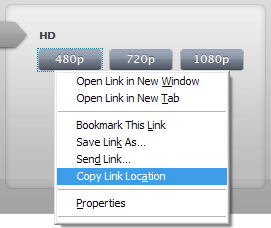
Then go to Apple Trailer website and copy the link/shortcut as shown below for Internet Explorer and Mozilla Firefox:
Internet Explorer Copy Shortcut Mozilla Firefox Copy Link Location 

Open your apple.html file in any browser and paste the link in the field provided and click on Create Link button to create the HTML link to the movie trailer file. Not right click on the link and Save the Target file to your PC.

Apple.html file 
Apple.html file as seen in browser

Enjoy your trailers and feel free to modify or use this file on your PC/Servers :)

Friday, May 8, 2009

SQL Server Paging and displaying Paged results on HTML Page

This is a situation which every SQL Server developer might face once in his lifetime. How to retrieve results based upon row counts? and display them on HMTL Pages. For the dismay SQL Server does not provide functionalities like MySQL LIMIT/OFFSET which makes it a bit more complicated. But my simple trick allows you to do paging by using simple SELECT statement combined with TOP. Apart from SQL Paging I have also included code to implement paging in HTML Pages so if you are using some other database just change the query appropriately and you are good to go.

Suppose you have to list all the customers from some database table filtered by some search string and the user submits the search string from an HTML form which is passed on to the search page as URL string (search.aspx?search=searchstring). Search page then displays results (MAX_RESULTS) on each page. To keep track of the number of displayed results we can use another field num in the URL String. So the initial search string will look like:

search.aspx?search=searchstring&num=0

Now to implement the search.aspx code we need to get the variables from the URL String and set the MAX_RESULTS limit:

Dim search As String = Request.QueryString("search")
Dim num As Integer = CInt(Request.QueryString("num"))
If num < 0 Then num = 0
Dim MAX_RESULTS As Integer = 10

Next step is to format the SQL Query. I have used nested Selects to restrict the results by not selecting the results matching the inner Select statement. The second Select statement just selects the number of rows after which we need to display the results:

Dim where As String = "Firstname LIKE '%" & search & "%'" 
Dim
cmdString As String = "SELECT TOP " & MAX_RESULTS & " * FROM CUSTOMERS" & _
                          "WHERE CustomerId NOT IN (" & _
                          "SELECT TOP " & num & " CustomerId FROM CUSTOMERS" & _
                          "WHERE " & where & _
                          "ORDER BY FirstName )" & _
                          " AND " & where & _
                          "ORDER BY FirstName"

After executing the above query and displaying the results we need to display the links for Next and Previous page navigation. To do that we first need to get the total count (total_count) of results from the database using the following query:

cmdString = "select count(*) from CUSTOMERS WHERE " & where

To format the Previous and Next page URL’s with Next and Previous results left we have used two variables Next_URL and Prev_URL as follows:

Dim Next_URL As String = ""
Dim Prev_URL As String = ""
Dim Nav_Table As String = ""
If total_count > MAX_RESULTS Then 
 
Dim next_count = num + MAX_RESULTS 
 
Dim prev_count = num – MAX_RESULTS
 
If num = 0 Then
    Next_URL = "<a href=""search.aspx?search=" & search & "&num=" & next_count & """>Next(" & total_count - next_count & ")&gt;</a>"
    Prev_URL = "&nbsp;"

  ElseIf next_count > total_count Then
   
Next_URL = "&nbsp;"
   
Prev_URL = "<a href=""search.aspx?search=" & search & "&num=" & prev_count & """>&lt;(" & num & ")Prev</a>"

 
Else
   
Next_URL = "<a href=""search.aspx?search=" & search & "&num=" & next_count & """>Next(" & total_count - next_count & ")&gt;</a>"
   
Prev_URL = "<a href=""search.aspx?search=" & search & "&num=" & prev_count & """>&lt;(" & num & ")Prev</a>"
  End If
End If

If you are using some other database system or programming language, you just need to change the SQL statement appropriately and use the same logic to display the results in html.

Technorati Tags: